
MCP: how I wired my AI into everything (while everyone else is still chatting)
Coffee and tea, joined by chocolate-fudge cookies. Impossible? Not with the right connector. MCP does the same for your systems and processes.
 Martijn

Lots of people are still asking AI chat to write their LinkedIn posts – and many are complaining about that as well - or they are still using generative AI to create a cringy meme. All kiddie stuff, playing the game at the easiest level. I prefer to crank up the difficulty level therefore I have connected my AI Agent to a bunch of systems to do things each one of them couldn’t do on its own.
All thanks to a magical power-up called MCP. And this is how it started... Until recently, I had to chase colleagues across New Zealand to get extra info about how to improve our Support Station. I was after that wisdom from the field, the practical knowledge only the people have who work on a day-to-day basis with customers using and interacting with our products & service. Extra inside information to add fresh content to our Support Station or create new FAQ articles.
Now, I have an AI agent checking all email and chat conversations with customers and serving me a weekly list of what to update and where to add new content. That’s 100s of meaningful conversations audited and a dozen gaps flagged before I can finish my first coffee.
I’ve talked about my realistic view of AI and how companies & marketers can and should use it. So that means we can dive straight into the fun & digital tech part and talk about how the above mentioned use case is possible.
Table of Contents
MCP takes your AI game to the next level
MCP is short for Model Context Protocol – the language that connects your AI agent with heaps of systems that speak that language as well. Think of learning to speak Spanish and once you’ve mastered it you can do more than just order 2 beers in Sevilla.
This protocol was created by Anthropic in November 2024 and has been adopted by other AI companies and thousands of community servers. Via an MCP connection an AI agent can access and modify certain data or processes, if you allow it to do that.
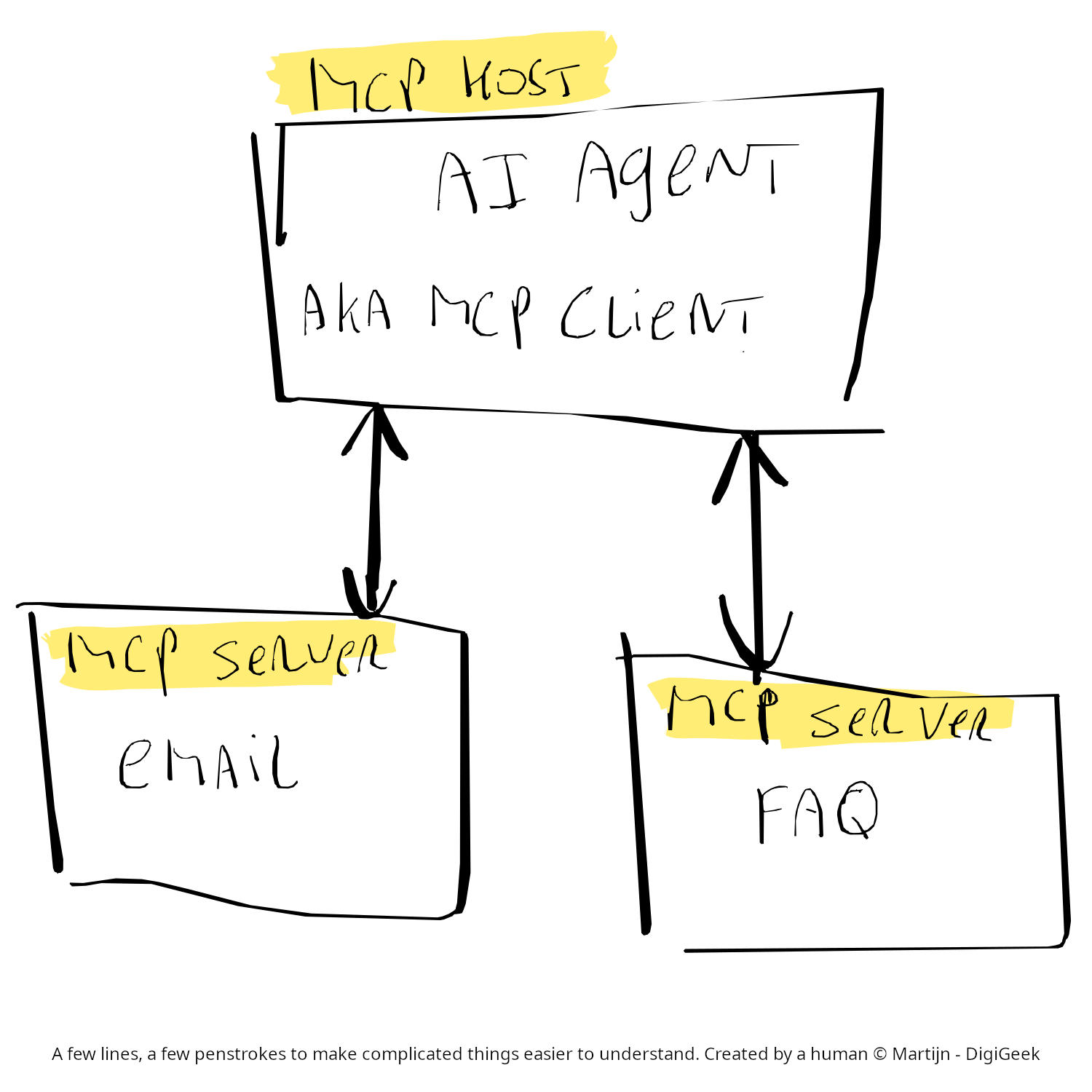
How MCP opens up a world of possibilities
By connecting your systems and processes via MCP – where you always have the option for public vs private – it opens a world of possibilities. Once you connect the first one, you’ll see the MCP option on a lot more tools and that is where the fun starts. Making connections and creating bridges between systems that could never be connected in the past, is where the possibilities lie.
Why the possibilities of MCP are endless but also limited
What you can do via a private MCP connection is limited by the commands and actions the system owner/creator allows it to do. For example, fetching certain data may be allowed but editing the data not.
It reminds me of the classic point and click (PnC) adventure, where your actions are limited by certain verbs: USE, LOOK AT, PICK UP etc. If a verb is not there, you can’t use it. The same with the access rights on your MCP connection. But the bright side is that MCP connections are relatively new so things are evolving. Tools may add new options later on or are open to feature request.
After a session of implementing MCP and connecting systems, I realised how true that comparison is. Playing the “new” Thimbleweed Park PnC adventure by Ron Gilbert and Gary Winnick (of Maniac Mansion fame) really shows how actions are limited by these basic commands. Talking about game art imitating life 😀
MCP connectors in the real world (use cases)
Even though there are limits to what you can do within an MCP connection, the possibilities are endless when it comes to the systems you use it on. If you look at your tech stack, you’ll see that a lot of them have added the option for a connection via MCP. Or they are working on it.
So let’s look at some real-world examples of the MCP connections I have created.
AI power to Customer Service Communications meets Knowledgebase
Knowledge often sits in the brains of colleagues and staff. It can be hard to get it all out of them – even if you ask – so you can get it into a self-service customer service system. They often give you a lot of good info but the small bits often get forgotten. Either because staff are busy helping customers or because they don’t think it is useful to other customers.
When you connect an AI Agent to both the customer communications system and the knowledgebase, all of a sudden you have all the info you want. It allows you to run a regular task of checking what has been said to customers, which problems have been solved and how then compare it with the data in your knowledgebase. Is it all there, or do current articles need updating or is there a need to add fresh FAQ articles?
All things your AI Agent can report on within seconds instead of you chasing one piece of info for days – especially in organisations with departments located in different geographical locations. And after analysing the suggestions yourself, you can instruct the AI to make the changes, do updates and/or add new articles.
As long as you have the right set of rules in place, guard-rails to make sure everything is done according to corporate specs or brand guidelines. You as human need to stay in control to make sure only the things get done that you want to have done.
Rules control the fun: make sure your agent doesn’t go rogue
As you may know, AI agents are programs you have created. When they go “rogue” it means that you forgot to add guard rails or they simply weren’t enough. A fun example from my work-life is that a specific AI agent was instructed only to report or make suggestions and then action the items that were approved by me.
However, discussing one of the suggestions made it believe that it was okay to implement the rest of the suggestions as well. So I ended up with discussing one suggestion and the system thinking that all suggestions could be implemented. No way. A new rule was put in place to make sure that suggestions only go live when I explicitly approve them and that discussing one does not mean approving one.
AI power to improve Service Level Agreement (SLA)
Another great use case is what you can do when your AI system is connected to the Customer Communications System. As it can analyse all communications – emails, chats and SMS – between your customer service team and customers it is also easy to set up an AI Agent that monitors the Service Level Agreement. It can then even chase certain messages or team members to make sure nothing falls between the cracks. When properly set up, it will do wonders for your SLA.
No more wondering if someone who needs to follow up, saw the tag or message itself. The AI Agent alerts someone on the fly and follow up if no response is registered. Cutting follow-up response times from 60 minutes to 10 minutes is easy to do while you are getting another cup of coffee.
Fresh content is king... But repetitive updates are boring
Imagine a great piece of content you created, whether for SEO or to inform your customers... Or both. It’s a crazy world so that’s all possible. For me, as Digital Marketing Geek working in travel & tourism, there are all kinds of questions future Space Travellers (roadtrippers) want to get answered, like the price of petrol in New Zealand.
With a simple AI Agent action, our article dealing with fuelling up your rental vehicle in New Zealand and the costs of that now gets a monthly automated updated. Now it always contains the latest petrol and diesel price data. No more manual updates needed, no more humans who forget to do the fuel price updates. Now it’s always up to date thanks to an AI Agent that taps into the system via MCP.
AI in real business life
That's why, when you understand and use things like MCP, you can do a lot more with AI. AI is not just a chat system to create a blog post or write a LinkedIn post for you – hell no, please keep doing these things yourself – it is a full-service connector that can empower your staff and enhance the functionality of your systems.
Have you already begun to connect systems & processes via MCP?